Webhook - Callgent Event Entry
The callgent you create is no more than the delegate to a business service. It receives requests from Client entrys (CEP), then maps the requests to specific Server Entrys (SEP) to do invocation to the actual business service.
There is one more scenario, where the actual business services may have several internal Service Events to notify users/clients, usually via webhook or emails.
Callgent provides Event Entrys (EEP) to receive these events.
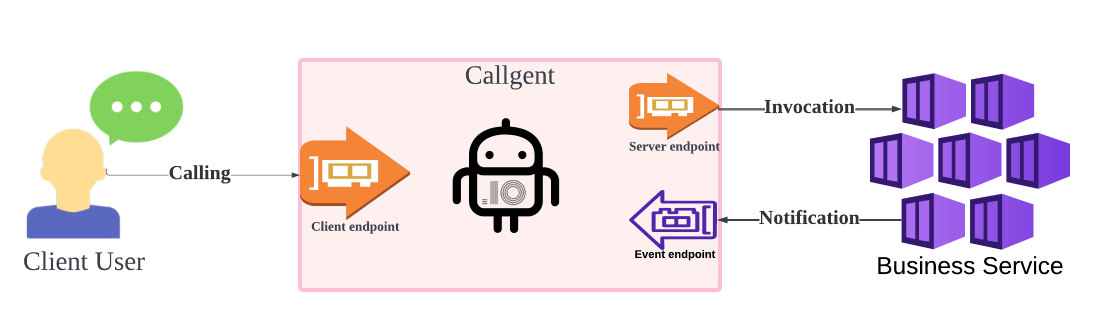
Both CEPs and EEPs accept requests. The difference is that, CEPs directly map requests to SEPs, while EEPs only publish request events to registered event listeners.
You may also treat service events notification as normal client calls. In this case, you can configure CEP URLs as webhook address in business services.
Let's try it by configuring webhook as a CEP.
First create a callgent:
By default, a callgent has 2 CEPs:
- Email CEP: accepts requests by email
- API CEP: accepts requests from REST API
and 1 Email SEP: which will relay every request to your account Email address.
Just copy the CEP address, paste into your service webhook configuration.
For example, paste the API CEP address into canny.io:
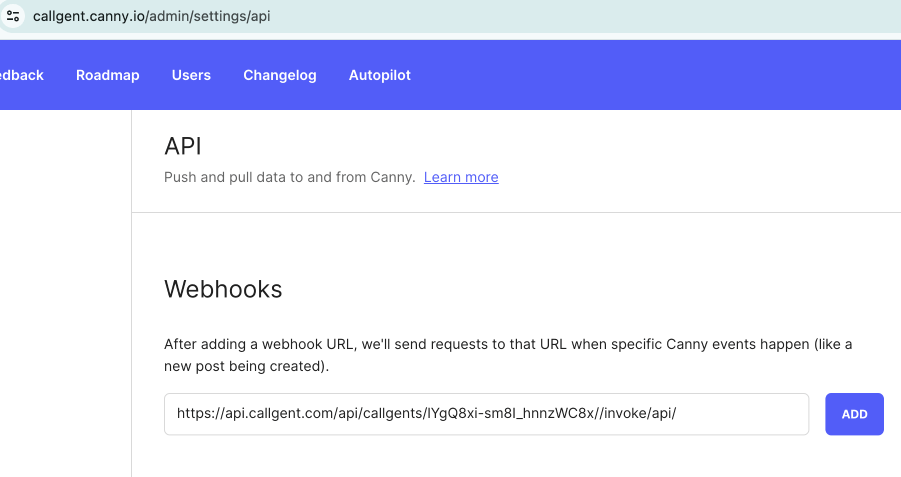
Now you can receive all notifictions from you account Email.
If you want to handle these notifications, you may add another SEP or orchestrate another callgent to complete your business workflow.